How far can I shoot at game with my load?
The app does not decide how far is right for you: it shows your load's energy and speed at a range, and works out where the limits you set run out. Use Terminal Ballistics or Effective Range for the facts at a range, and Ethical Shot Distance to see which of your own limits ends first.
The steps
The same on iPhone and Android. The app states facts about your load at a range. It does not tell you whether a shot is ethical or legal, and every limit on these screens is a number you can change. Effective Range is free. Terminal Ballistics works on the rifle on the Bench, so it needs a sample rifle, Pro or the 7-day free trial. Ethical Shot Distance is Pro only (the trial counts).
-
See the speed and energy at a range. Open More, then Hunting, then Terminal Ballistics. Set the Range, then tap Use Calculator Load. It solves your Calculator load at that range and fills the impact speed, bullet weight, diameter and bullet type. Impact Energy and Momentum show under Energy & Momentum.
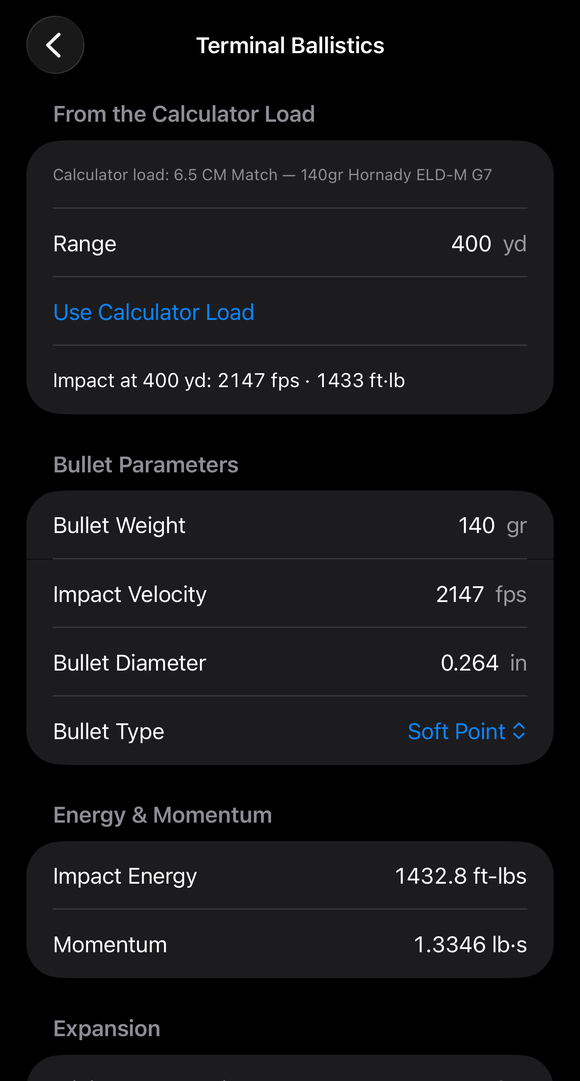
After Use Calculator Load at 400 yd: the bullet fields are filled (140 gr, 2,147 fps, 0.264 in, Soft Point) and Energy & Momentum show. -
Compare the impact speed with your bullet maker’s expansion speed. Under Expansion, type the Minimum expansion speed your bullet’s maker publishes. The screen says to use “the minimum expansion (impact) speed your bullet’s maker publishes.” It then states how far above or below that speed the impact is, and how far out the Calculator load stays above it. (Guide: Terminal Ballistics)
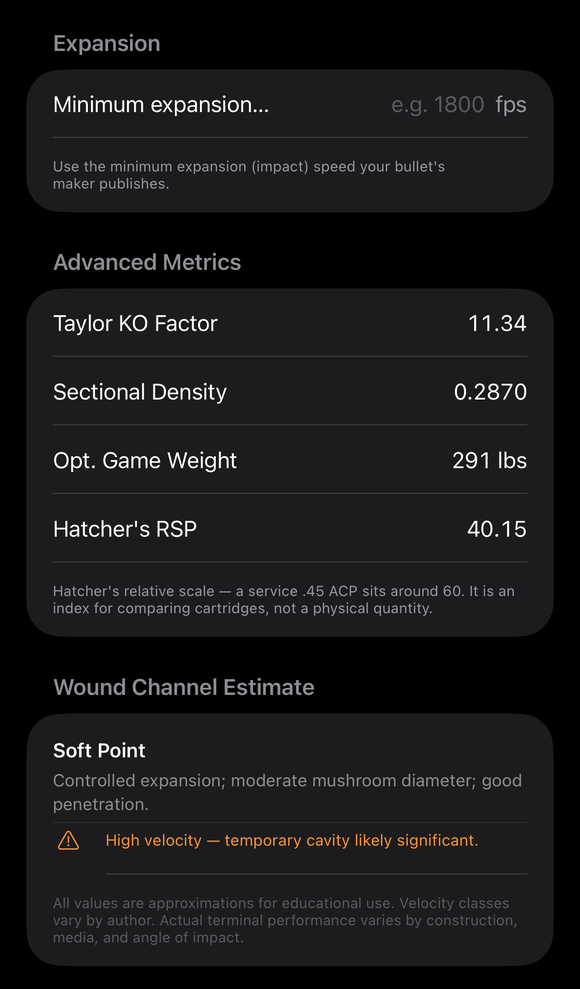
Further down in Terminal Ballistics: the Expansion minimum, Advanced Metrics (Taylor KO Factor, Sectional Density, Opt. Game Weight, Hatcher's RSP) and the Wound Channel Estimate for the bullet type. -
Find where your own energy limit ends. Open More, then Hunting, then Effective Range Calculator. Under Energy Threshold, pick a Preset or Custom and set Min Energy (ft-lbs) to the figure you hold yourself to. Under Load Data, type the muzzle velocity, BC, weight and Drag Model, set the zero range, sight height and conditions, and tap Compute Effective Range. The result shows Effective Range, Binding Constraint, Energy at Range and Velocity at Range.
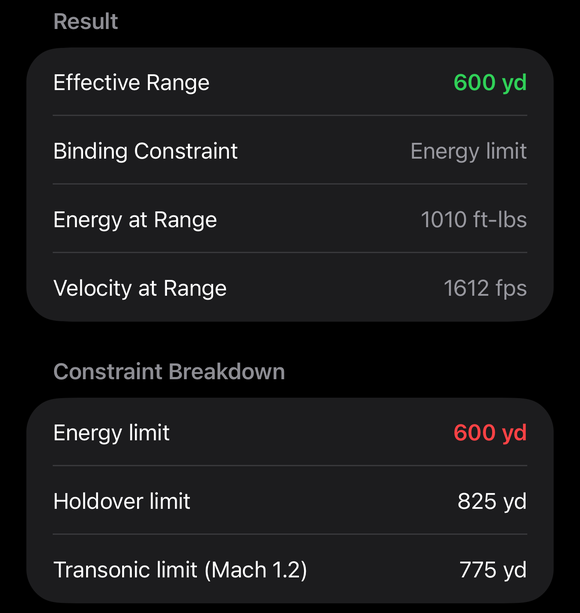
A result: Effective Range 600 yd in green, Binding Constraint Energy limit, Energy and Velocity at Range, and the Constraint Breakdown (energy, holdover and transonic limits). -
Open Ethical Shot Distance. Open More, then Hunting, then Ethical Shot Distance. This screen does not copy the Calculator’s load, so type it under Load Data: Muzzle Velocity (fps), BC, Weight (gr) and Drag Model (G1 or G7). The screen opens with no BC, so enter the BC for the drag model you pick. Under Rifle and Conditions, set the Zero Range, Sight Height, Temperature, Pressure, Humidity and Altitude.
-
Set the target and your own accuracy. Under Vital Zone / Target, pick a Preset (an animal or a steel target) or switch on Custom Diameter and type the size. Under Shooter Capability, pick a Skill Level: Expert (0.5 MOA), Proficient (1.0 MOA), Novice (2.0 MOA) or Custom (measured group), which asks for Group Size at 100 yd (in). The screen says: “Your practical accuracy ceiling — use a realistic field group, not bench rest.” Set Wind Uncertainty with the slider, from ±0 to ±10 mph: “Undetected crosswind variation in the field.”
-
Set your minimum energy. Min Terminal Energy (ft-lbs) starts at an app default of 1,000. The note under it says what that number means and that this tool checks the energy at the target, not at the muzzle. Change it to the figure that applies to you, your game and the rules where you hunt.
-
Tap Compute Ethical Max Range and read which limit ends first. The result is Ethical Maximum, with “Limiting factor:” naming the limit that comes first. The Breakdown lists Energy limit, MPBR (optimized zero), Wind + Accuracy and Trajectory Coverage, with an arrow on the one that binds. The screen calls its range color “the app’s guideline, not a published standard.”
If it went a different way
- It says No range. No checked range passes every limit, and the reason is written in numbers under it, such as the muzzle energy against your minimum. Check that Min Terminal Energy is the figure you meant.
- A row says No limit within 2,000 yd. The screen solves out to 2,000 yards, and a limit that did not end inside that reads this way (in meters when your units are metric). It says only that the limit was not reached within the solve, not that the load carries that far.
- A note says Outdated. You changed an input after computing. The result is dimmed with “Outdated — inputs changed, recompute for a current answer.” Tap Compute Ethical Max Range again.
- Compute Ethical Max Range is grayed out. The screen needs positive values for the vital zone, group size, muzzle velocity, BC, bullet weight and minimum energy.
The Ethical Maximum comes only from the numbers you typed: the size of the vital zone, your group, your wind uncertainty, your minimum energy and the load. It does not know the animal, the angle of the shot, the wind at the target or the rules where you hunt. Whether a shot is right is your decision.
The full detail, with a picture of every screen, is in the Operator’s Guide: Ethical Shot Distance. More how-to answers. Questions? Contact support.