What zero distance gives my cartridge the flattest trajectory?
There is no single best zero for a cartridge, because it depends on your load, your sight height, the air and the distances you shoot. The Zero Distance Explorer's Find Best Zero tries every whole yard or meter for your load and lists the three zeros that keep the bullet closest to your point of aim across the range band you set.
The steps
The same on iPhone and Android. The Explorer works out the answer for your rifle and load, so it needs them on the loadout first. It is free on the five sample rifles and needs Ballistics Pro or the 7-day free trial on your own rifles. The numbers in the pictures are examples.
-
Put your rifle and load on the loadout. On the Calculate tab, choose the rifle and the load you will shoot. The Explorer uses the Calculator’s own load, sight height and air, and its Projectile, Firearm and Atmosphere cards at the top are the Calculator’s own: a change you make there is a change in the Calculator.
-
Open the Zero Distance Explorer. Go to More, then Zero & Truing, then Zero Distance Explorer. If you do not see it, search the More menu for best zero or flattest. The Zero Distance box starts at the Calculator’s zero distance.
-
Set the range band. Under Range Band, type From and To: the nearest and farthest distances you shoot. It starts at 25 to 300, in yards or meters to match Settings, System, Measurement System. The answer is only for this band.
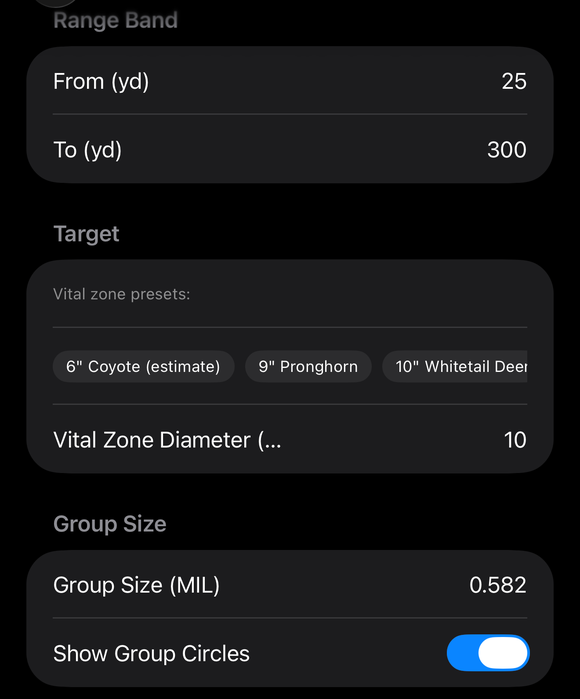
The Range Band From and To, the Target presets with the Vital Zone Diameter, and the Group Size with the Show Group Circles switch. -
Tap Find Best Zero. The app tries every whole yard (or meter) from the shortest zero up to the end of your band. It lists the three zeros with the smallest Largest miss. A zero’s largest miss is the farthest the bullet is above or below your point of aim at any distance in the band, so the smaller the number, the flatter the path for you. Tap a row to put that zero in the Zero Distance box and redraw the picture and the Impacts table.
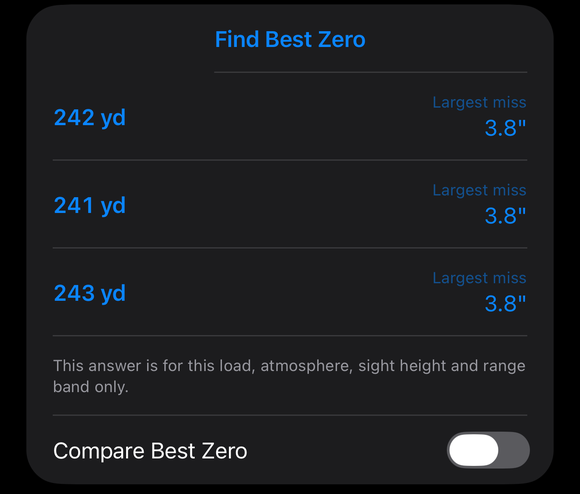
Find Best Zero lists the three best zeros, each with its largest miss, with the Compare Best Zero switch below. -
Compare it with your own zero. Type your current zero in Zero Distance (or drag the slider) and turn on Compare Best Zero. The best zero’s impacts are drawn as hollow rings behind yours, and the line under the table reads “Largest miss: yours …, best …”.
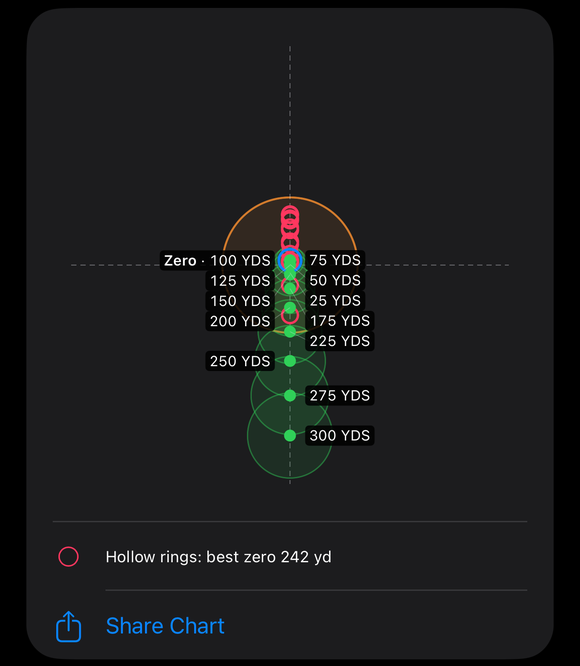
Compare Best Zero on: the best zero's impacts drawn as hollow rings behind the green dots. -
Optional: size it to a vital zone. Find Best Zero does not use a vital zone or a group size. To ask how far you can shoot without changing your hold for a given vital zone, open More, then Hunting, then Point Blank Range (MPBR). Type a Vital Zone Diameter (or tap a preset) and the muzzle velocity, BC and Drag Model of your load, and tap Compute MPBR. The Result gives Max Point Blank Range, Near Zero and Far Zero, and the Explanation says it in words. This tool is free, and it does not read your rifle: it uses only the numbers you type.
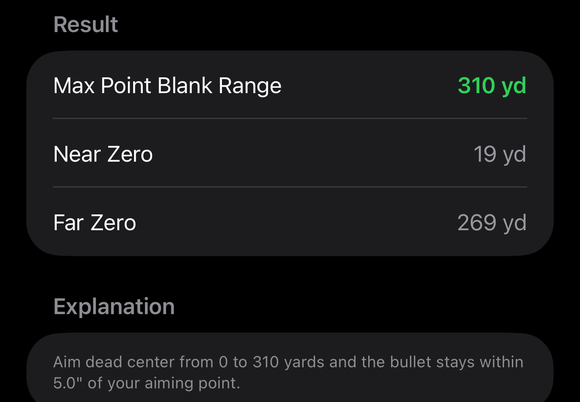
The Point Blank Range result: Max Point Blank Range, Near Zero and Far Zero, and the plain-language Explanation. -
Zero for real, then tell the app. The Explorer changes nothing in the Calculator’s zero. At the range, zero your rifle at the distance you picked. Then on the Calculate tab, in the bench’s Zero part, type that distance in Zero distance, tap Zeroed Here, and answer Make this the zero? with Zeroed with this setup.
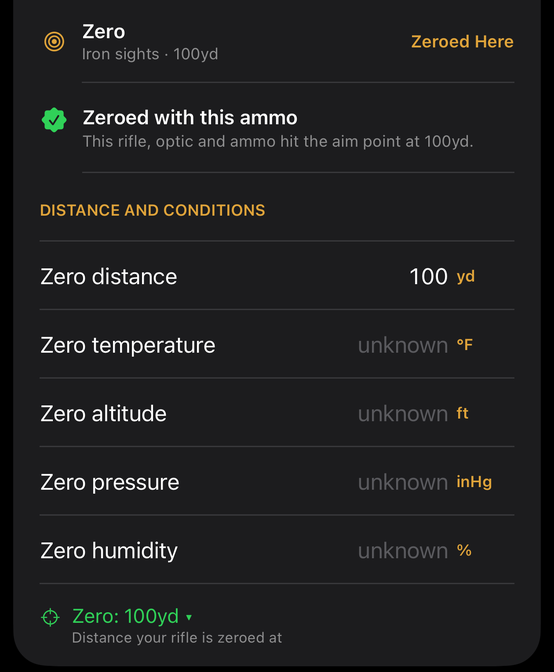
The Zero part once the ammo is zeroed: Zeroed with this ammo, the zero distance and the weather it was zeroed in.
If it went a different way
- Find Best Zero is gray, or a red line appears. The line says why, in the app’s words, for example “Start range must be less than end range.” or “The bullet’s flight ends before … Lower the To range.” Fix the band and try again. With Coriolis switched on and no usable position, the Explorer shows Calculate’s own message and solves nothing.
- The three results are close together. That is the band’s answer: nearby whole distances do almost the same job. Tap a row to see its picture.
- Your own zero shows a bigger largest miss. That is what the comparison is for. It does not mean your zero is wrong, only that another distance holds the path closer to your point of aim over this band.
This answer is for this load, atmosphere, sight height and range band only. The Explorer solves the shot level, with no cant and no zero offset, so the bullet meets the point of aim at the zero distance. Change the load, the air, the sight height or the band and ask again.
The full detail, with a picture of every screen, is in the Operator’s Guide: Zero Distance Explorer. More how-to answers. Questions? Contact support.