
Does the app work for a subsonic or short-barrel load like .300 Blackout?
Yes, the Calculator solves whatever muzzle velocity you type, and its Warnings list says the bullet is subsonic from the muzzle when the load leaves the barrel below Mach 0.8. Effective Range and Ethical Shot Distance show No range, with the reason in numbers, when no range they check passes the limits you set.
The steps
The same on iPhone and Android. Calculating a rifle of your own takes Pro or the 7-day free trial; the five sample rifles calculate free. Effective Range is free. Terminal Ballistics works on the rifle on the Bench, so it needs a sample rifle, Pro or the trial.
-
Type the muzzle velocity you measured. The Add Rifle setup in My Armory (tap +) asks for the bullet, the BC and the muzzle velocity; to give a rifle another load, tap + and choose Add Ammo. Type the muzzle velocity you measured with that barrel on a chronograph. The Calculator solves from the velocity you type and does not work out velocity from barrel length, which it only stores with the rifle. If the muzzle velocity is empty, the Estimate … fps button fills the middle of the cartridge’s typical range, which is not a figure for your barrel.
-
Enter the BC with its drag model. Pick the bullet with Choose Bullet, or type its weight, diameter and BC, and set the Drag Model the BC was published for (for example G1 or G7). A BC and its drag model belong together; the app saves them as a pair.
-
Calculate and read the Warnings list. Enter your target range on the Calculate tab and tap Calculate. The results open with a Warnings list above the header strip. A load that leaves the barrel below Mach 0.8 reads “Bullet is subsonic from the muzzle”. One that leaves between Mach 0.8 and 1.2 reads “Bullet is transonic from the muzzle”. A load that starts faster reads “Bullet enters transonic zone at” a range, then “Bullet goes subsonic at” a range, each naming the first Drop Table row in that speed zone.
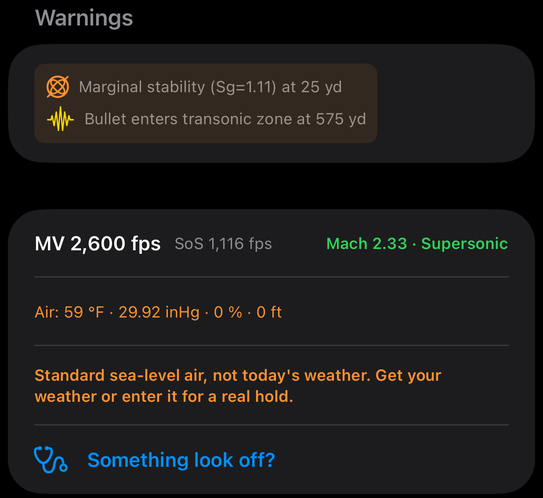
The top of the results: the Warnings list, then the header strip with the muzzle velocity, speed of sound, Mach number, the air the answer was solved in, and a Something look off? row. -
Find the zones in the Drop Table. Open the Drop Table tab. Rows below Mach 0.8 show in orange, and the Columns editor can add the Mach column. The app uses one definition everywhere: transonic is Mach 0.8 to 1.2, and subsonic is only below Mach 0.8.
-
Check the energy limit with Effective Range. Open More, then Hunting, then Effective Range Calculator. Under Energy Threshold, pick a Preset or Custom and set Min Energy (ft-lbs) to the figure you want to hold the load to. Under Load Data, type the muzzle velocity, BC, weight and Drag Model, set the zero range, sight height and conditions, and tap Compute Effective Range. The result shows Effective Range, Binding Constraint, Energy at Range and Velocity at Range, and the Constraint Breakdown rows Energy limit, Holdover limit (if you turned it on) and Transonic limit (Mach 1.2).
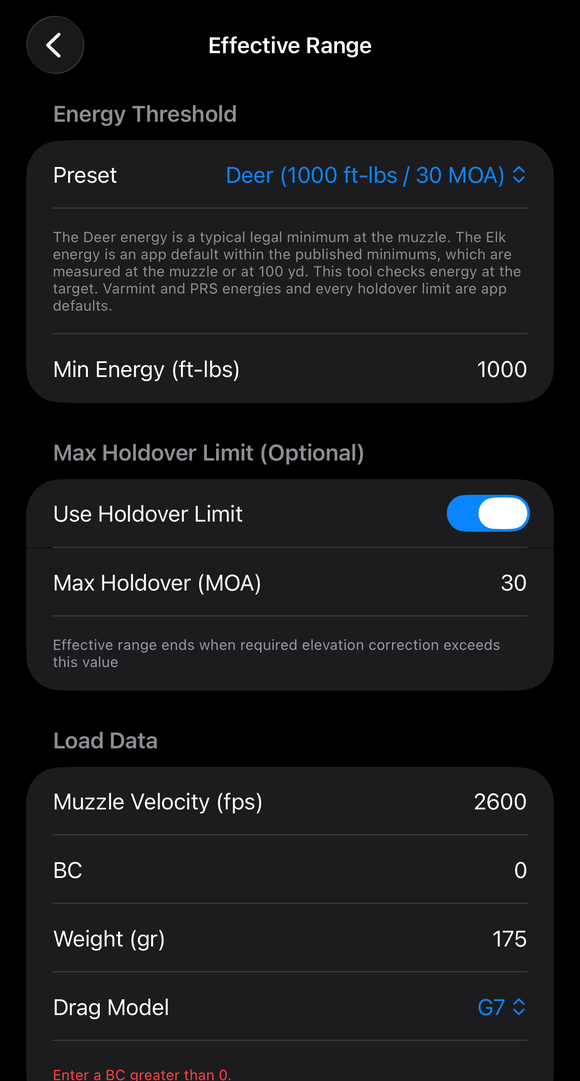
The Effective Range Calculator: the Energy Threshold preset, Min Energy, the Max Holdover Limit switch and field, and the Load Data fields. -
Read No range and Does not apply. If no checked range passes your limits, Effective Range reads No range in red, with the reason in numbers under it, for example “Muzzle energy 466 ft-lbs is below your 500 ft-lbs minimum.” The energy and speed shown are then the muzzle’s own (Muzzle Energy and Muzzle Velocity). For a load that already leaves the muzzle at or below Mach 1.2, the Transonic limit (Mach 1.2) row reads Does not apply and a note gives the muzzle Mach, so the transonic limit does not bind the answer at 0 yd.
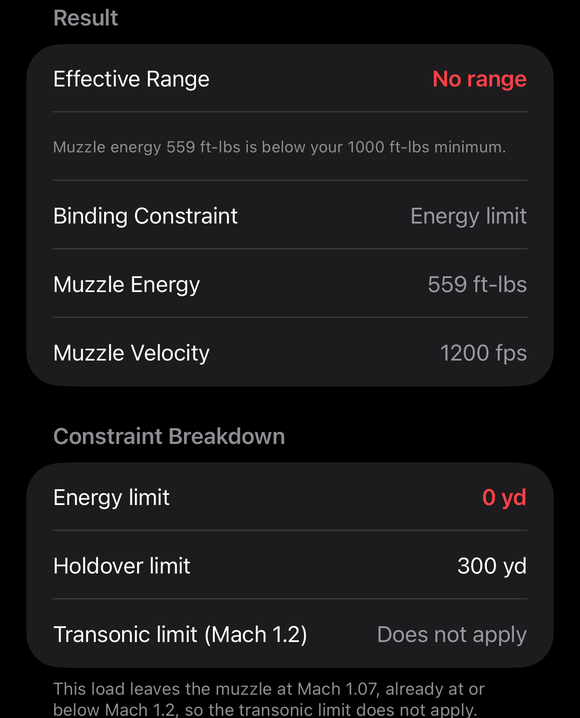
A load below the energy limit: Effective Range shows No range in red with the reason, the muzzle energy and velocity, and the transonic limit reads Does not apply. -
Compare the impact speed with your bullet’s expansion speed. Open More, then Hunting, then Terminal Ballistics, set the Range, and tap Use Calculator Load. Under Expansion, type the Minimum expansion speed your bullet’s maker publishes. The screen says how far above or below it the impact speed is, and how far out the Calculator load stays above it. (Guide: Terminal Ballistics)
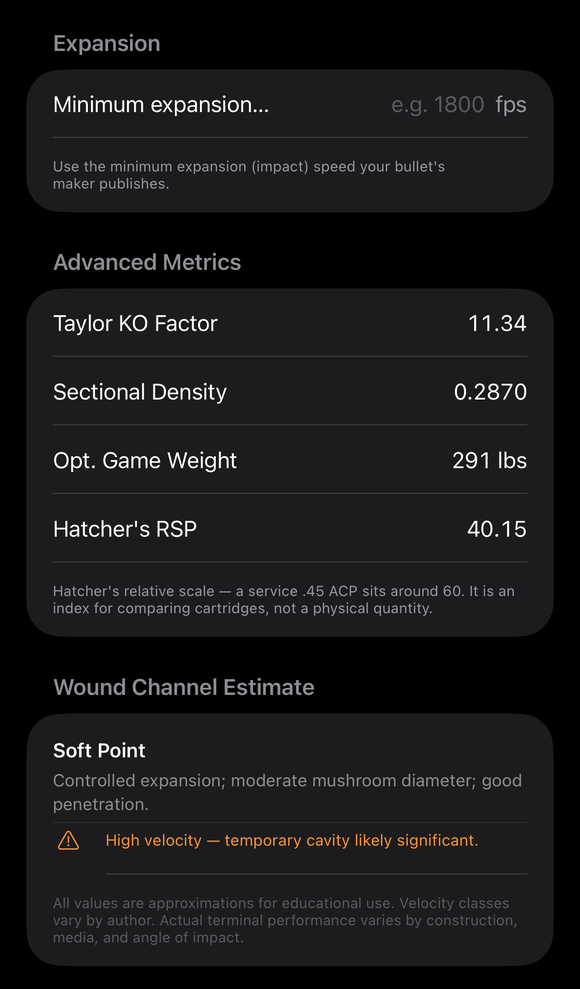
Further down in Terminal Ballistics: the Expansion minimum, Advanced Metrics and the Wound Channel Estimate for the bullet type.
If it went a different way
- The Drop Table has no orange rows. The load never drops below Mach 0.8 inside the table, or the table stops earlier. Rows between Mach 0.8 and 1.2 are colored only when your view preset has Highlight Transonic on; the Warnings list names that range either way.
- A head or tail wind changes the muzzle zone. The muzzle zone is the bullet’s speed through the air at launch, so a head or tail wind counts.
- You use two or more BCs for one bullet. The load editor takes velocity-dependent BC steps with Add BC Step.
- Ethical Shot Distance (Pro) also says No range. It uses the same wording and reasons when its limits fail at the first range it checks.
The answer is only as good as the muzzle velocity, the BC and the drag model you give it. The BC scales a standard drag curve, and a bullet’s real drag between Mach 0.8 and 1.2 can differ from that curve. The app does not know your barrel’s real velocity, and its Effective Range and Terminal Ballistics screens state facts about the load, not whether it is enough for your purpose.
The full detail, with a picture of every screen, is in the Operator’s Guide: Effective Range Calculator. More how-to answers. Questions? Contact support.